Material utilization calculator sheets: what drives margin
When teams search for a material utilization calculator sheets workflow, they usually want one thing: a fast number they can trust before release.
The challenge is that utilization percentages are easy to produce and hard to interpret. A percentage can look strong while still hiding production risk, unnecessary cut complexity, or stock assumptions that fail on the floor.
This guide explains how to calculate utilization in a way that supports real decision-making, not just report formatting.
What a sheet utilization number should represent
A useful utilization metric answers a practical question:
How much of the purchased sheet area becomes placed parts in the selected plan, given the real constraints for this job?
In operational terms:
- The numerator is placed part area.
- The denominator is total area of the sheets consumed by the selected strategy.
- The setup includes real kerf, orientation rules, stock limits, and material grouping rules.
If any of those setup inputs are unrealistic, the utilization percentage is still mathematically correct but operationally misleading.
A simple formula that stays production-safe
Use this baseline formula:
Utilization (%) = (Placed part area / Used sheet area) * 100
Then track waste explicitly as the complement:
Waste (%) = 100 - Utilization (%)
For teams comparing multiple alternatives, keep both values side by side for each strategy. Do not compare utilization in one table and cuts in another view. The fastest way to create confusion is to separate KPIs from the actual chosen layout.
Why calculators fail in real projects
Most utilization calculators fail for one of four reasons:
- They evaluate ideal stock, not actual stock.
- They apply default kerf that does not match the blade in use.
- They ignore grain or orientation rules until late in review.
- They compare strategies before constraints are fully set.
Each issue can shift the final utilization by enough to change the plan decision.
Example failure mode
A team reports 82% utilization during quoting, then lands at 74% after production setup. Nothing changed in part demand. The drift came from late kerf correction, orientation enforcement, and replacing unavailable stock sheets. The utilization number was never wrong in isolation; it was measured against the wrong scenario.
Setup checklist before you trust the number
Run this checklist before you accept any material utilization output:
- Units are consistent across all inputs.
- Duplicate part rows are removed.
- Stock dimensions and sheet counts reflect availability.
- Kerf is configured for current blade thickness.
- Orientation or grain constraints are applied where required.
- Unplaced parts are reviewed and not ignored.
If one item fails, treat the utilization number as provisional.
For teams that need a full setup flow, start in the live CutOps workspace and validate the checklist before final comparison.
Benchmark ranges that are useful in practice
Utilization targets vary by product mix, but rough working bands help decision speed:
- Below 70%: usually a setup or stock-modeling issue, not just a hard job.
- 70% to 82%: common in mixed-complexity projects with realistic constraints.
- 82% to 90%: strong performance when demand shape fits stock well.
- Above 90%: possible, but requires validation that cut complexity and handling time remain acceptable.
Treat these as operational ranges, not hard pass/fail rules. A 79% plan can outperform an 84% plan if it reduces rework and handling overhead.
Compare alternatives with context, not headlines
A utilization calculator is most useful when it supports strategy comparison rather than a single default run.
At minimum, compare:
- Utilization (%)
- Waste (%)
- Total cuts
- Cut length
- Sheets used
- Unplaced parts
Then decide with business context:
- Is material cost or throughput the current priority?
- Is this a one-off project or a repeatable product family?
- Is operator readability more valuable than a minor utilization gain?
To structure this review, use the strategy-focused page on compare optimization strategies and keep the chosen layout tied to the same KPI row.
Kerf is the fastest way to break utilization trust
If your kerf is wrong, every area-derived metric loses reliability.
That is why utilization analysis should include a kerf check before sign-off:
- Confirm current blade thickness.
- Confirm kerf value in the optimizer.
- Re-run alternatives after kerf updates.
- Re-check unplaced parts and waste pattern.
When teams skip this, they often select a plan that looks efficient and then requires emergency adjustment in production.
Use the practical setup flow in kerf-aware cut list optimizer guidance when your team changes blades frequently or sees repeated fit drift.
Build a repeatable utilization review cadence
A reliable calculator process is less about one perfect run and more about consistent cadence:
- Load parts and stock.
- Validate setup baseline.
- Apply constraints.
- Run at least two strategy variants.
- Compare KPIs and layout readability together.
- Select and export from the same decision context.
- Capture post-run outcomes.
This sequence is short enough for daily use and strong enough for auditability.
Common interpretation mistakes and fixes
Mistake: treating utilization as the only success metric
Fix: keep cut count and cut length visible in the same row. High utilization with extreme cut path can increase labor and defect risk.
Mistake: comparing different stock assumptions
Fix: freeze stock model before strategy comparison. If stock assumptions change, restart the comparison set.
Mistake: ignoring unplaced parts because utilization looks good
Fix: zero-unplaced is a release gate condition unless the business explicitly accepts partial allocation.
Mistake: forcing one benchmark across all materials
Fix: set material-aware benchmarks. Wood, aluminum, glass, and plastic workflows do not share identical utilization behavior.
What to record after each project
If you want your utilization calculator process to improve over time, capture the same post-run fields on every completed job:
- Planned utilization vs final accepted utilization.
- Final waste percentage.
- Selected strategy and why it won.
- Late changes to kerf or orientation settings.
- Any unplaced parts and resolution path.
This record turns isolated project outcomes into default-setting intelligence for future runs.
A practical decision rule for close alternatives
Many teams face near-identical alternatives where headline KPIs differ by very small amounts. In this case, define a threshold so the team does not over-optimize noise.
A practical rule is to treat tiny cut-length gaps as equivalent and decide by readability or handoff clarity. This avoids unnecessary switching between near-identical plans and keeps execution stable.
Where this fits in CutOps
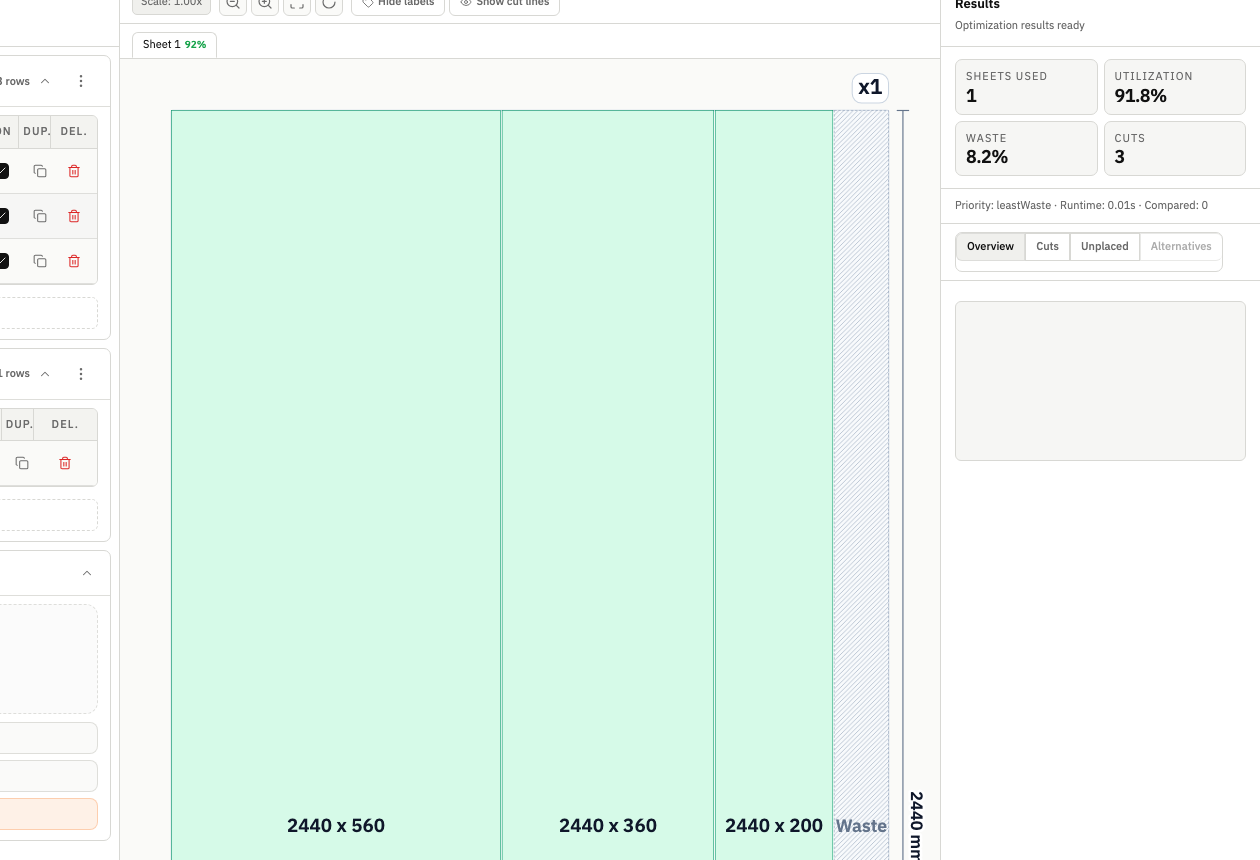
CutOps keeps utilization analysis in the same workspace as layout review and export, which removes a common source of planning drift.
Use this workflow:
- Open a project in the optimizer workspace.
- Apply kerf and orientation constraints before serious comparison.
- Run and review alternatives in one results context.
- Select the plan with balanced operational fit, not just top-line utilization.
- Export from the chosen state without reformatting.
When the utilization metric is grounded in realistic constraints, it becomes a planning signal you can trust across estimator, planner, and operator handoff.
Final takeaway
A material utilization calculator for sheets is not just a formula. It is a decision system.
The percentage matters, but only when measured against real stock, real constraints, and real workflow priorities. Teams that treat utilization as part of a repeatable operating process consistently reduce avoidable waste, shorten planning loops, and protect margin without sacrificing floor execution quality.
If your current numbers change dramatically between quote and production, the fix is usually not a better spreadsheet. The fix is a tighter setup and comparison process that keeps utilization, strategy, and export in one controlled flow.