Facade and panelized assemblies
Plan high-volume rectangular aluminum parts with realistic stock constraints and verify expected utilization before purchase or release.
Aluminum Fabrication
CutOps gives fabrication teams a clear workflow for planning aluminum cuts. Enter your stock sizes, add the parts you need, and run a layout. Review sheet usage, cut count, and panel placement — before anything reaches the saw.
Aluminum scrap is expensive. A bad plan means wasted stock, recuts, and lost time. CutOps gives everyone — estimator, planner, operator — the same layout and the same export.
Some features are available only on paid plans.
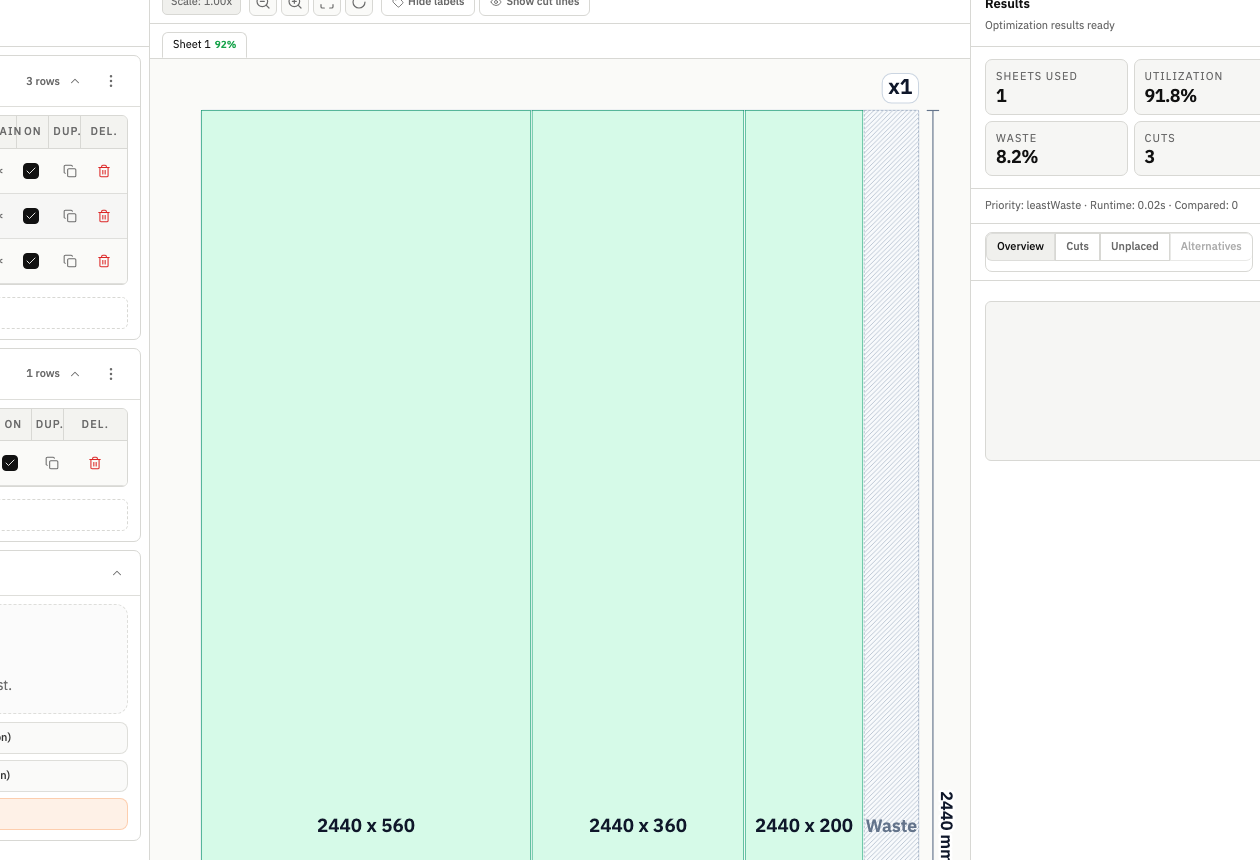
Good planning balances waste reduction with how hard the cuts are to run. CutOps shows both in one view. Teams can choose the layout that fits their shop — not just their spreadsheet.
CutOps shows sheet usage, utilization, and cut count in one place. Review a job fast. Try alternatives when needed. That is hard to do with a spreadsheet alone.
Exports are built for production use. You get a visual layout and a structured cut list from the same run. Share them with the floor or send them to a client — no reformatting needed.
Plan high-volume rectangular aluminum parts with realistic stock constraints and verify expected utilization before purchase or release.
Compare variants for small and medium batches where reduced cut complexity may outperform pure waste minimization in real production.
Export clear layout references and structured cut lists so quoting assumptions remain traceable throughout fabrication.
Build topical context from feature-specific workflows. Use these pages to compare optimization strategies, validate constraints, and move from planning to production release with fewer surprises.
Yes. CutOps is designed for rectangular sheet and panel optimization workflows, including aluminum flat stock planning where yield and cut complexity both matter.
Yes. You can run and evaluate different strategy priorities so teams can choose the best balance of utilization, cut simplicity, and throughput for each job.
CutOps supports PDF, CSV, PNG, and JSON export. Teams typically pair a visual layout export with a structured cut list for handoff and documentation.
Yes. You can start with core layout planning in your browser and review the result before cutting.
Yes. CutOps supports PDF and PNG for visual handoff plus CSV and JSON for structured downstream use.
Start with real stock dimensions, optimize the run, and ship a clearer handoff package to production.
Cookie and privacy preferences
We use strictly necessary cookies to run CutOps. With your consent, we also collect limited analytics to improve the product. Read our Privacy Policy for details.